
Administer a bucket
Lifecycle rules, CORS, versions, storage classes, restores, prefix reports, access audit and search.
The settings you would otherwise open a provider console for, in the same window as the files they apply to.
Buckets on an account
An account connection lists every bucket its credential can see. Create a bucket from that list, or right-click one to open Lifecycle and CORS, check public access, find incomplete uploads or delete it once it is empty. The detail panel shows what the selected bucket supports.
Object headers, metadata and tags
The detail panel shows Content-Type, Cache-Control, Content-Disposition,
Content-Encoding, Content-Language, x-amz-meta-* values and object tags. Choose
Edit there, or Headers and tags from an object’s context menu, to change
them without downloading the contents.
Changing headers or user metadata rewrites the object with a server-side copy, so its modified time changes and a versioned bucket gains a version. Tags use a separate provider operation and do not rewrite the object. Cargocat refuses a rewrite it cannot preserve faithfully, including archived objects, objects over 5 GB, customer-provided encryption keys and unsupported access grants. The tag editor is hidden when a provider, such as Garage, does not implement tagging.
Lifecycle rules
View the bucket’s current rules as they are, and edit them. Because a lifecycle rule deletes or transitions objects on a schedule with nobody watching, the editor shows what the rule you are about to save actually matches before you save it.
CORS
The bucket’s CORS configuration, editable. Note that previews do not need it — see Preview objects — so if you were about to loosen a policy in order to look at your own files, you do not have to.
Versions
Where the provider supports versioning, every version of an object is listed with its size and timestamp. You can preview an old version in place, the same as any other object, and restore or remove one.
Storage classes and restores
See which class each object is in, change it, and restore objects from cold tiers. A restore takes as long as the provider takes; the request and its progress are tracked rather than fired and forgotten.
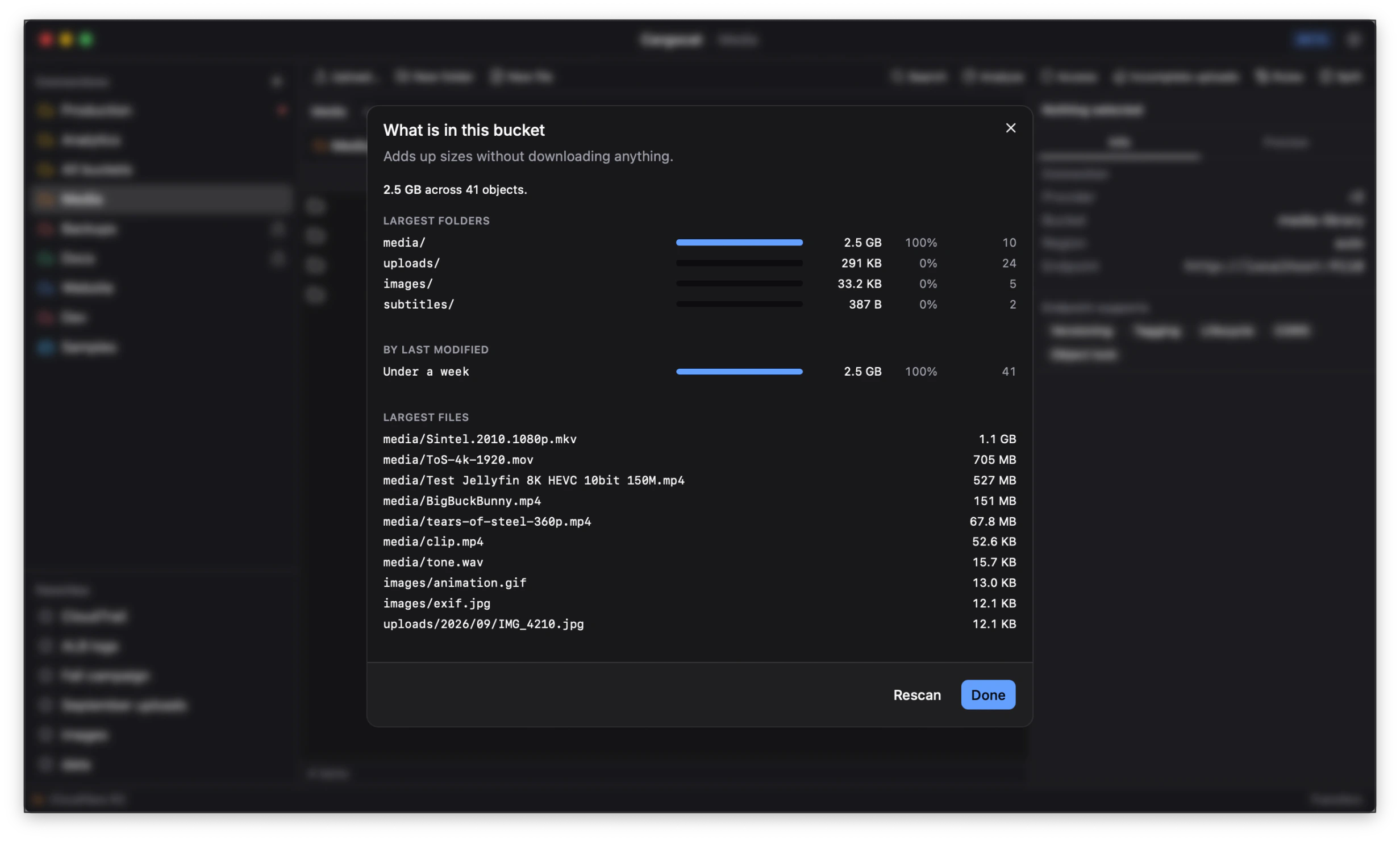
Prefix reports
What is actually taking up the space, by prefix — so “the bucket is 4 TB” becomes “one prefix is 3.6 TB of it”. This is usually the first step in reducing a storage bill, and the step most consoles make tedious.
Access audit
The policies and permissions in force, read back from the provider and presented as what they permit rather than as raw JSON.
Search
Across a bucket, by key. Results stream in as they are found rather than after the whole listing completes.
Availability differs by provider
Everything above depends on the provider supporting it. Cargocat probes on connect and offers only what is actually there — see Connect a provider. A missing tab means the provider does not implement that feature, not that the app cannot reach it.
What cannot be undone
Deletes, lifecycle changes and multipart aborts take effect at the provider. Where versioning is on, a delete is recoverable; where it is off, it is not. Cargocat records what it did in the activity trail, but no client can recover what a provider has removed.