
Connect a provider
Connect an object-storage account, one bucket or a local folder, choose credentials, and set safeguards before you browse.
A connection points to an object-storage account, one bucket, or one folder on this machine. For object storage it also records the provider, region, endpoint and credential method. A bucket connection can optionally begin at one prefix.
Connect object storage
- Choose New connection, then Object storage.
- Give the connection a name and choose its provider preset.
- Set the region and any endpoint values the preset asks for.
- Choose how the connection gets credentials — see below.
- Leave Bucket blank to browse every bucket the credential can list, or enter one bucket to make a narrower connection. List buckets can fill the field; a bucket-scoped credential may require you to type the name instead.
- If a bucket connection should begin below its root, enter that prefix in Folder.
- Turn on Read-only or Production if either safeguard applies.
- Choose Test connection. Save once the app confirms that the account or bucket is readable.
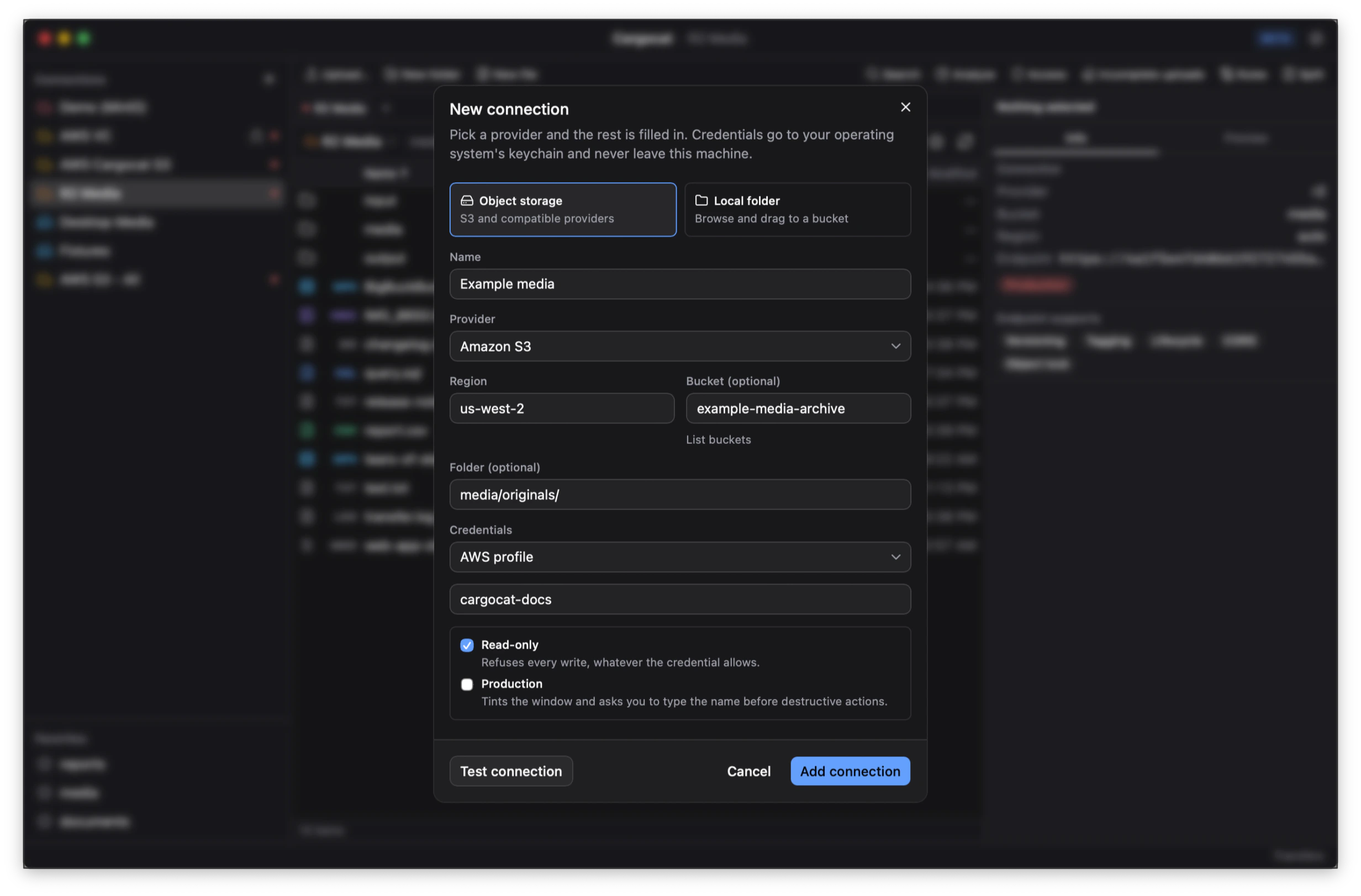
Account and bucket connections
An account connection leaves the bucket blank. Its root lists every bucket the credential can see, with the region and creation date. Open a bucket and the usual browse, preview, transfer and administration tools work there. Cargocat routes each bucket through its own region where the provider requires it.
A bucket connection opens one named bucket, or one prefix inside it. Use one when the credential is scoped to a bucket or when that narrower root is the safer workspace. Right-click an existing bucket connection and choose Connect to All Buckets to add an account connection with the same settings and saved key; the original connection is left alone.
Credential methods
- Access key stores the access key ID and secret in the operating system keychain: Keychain Services on macOS, Credential Manager on Windows and Secret Service on Linux.
- AWS profile reads a named profile already configured on this machine.
- Environment / instance role uses the ambient AWS credential chain, such as environment variables or instance metadata.
Only the first method stores a credential. Profiles and ambient credentials remain where they already live. Connection settings never contain a plain-text copy of an access key. See Credentials and privacy.
Create and delete buckets
The connection form can create the bucket named in its Bucket field. From an account connection, New bucket in the toolbar, File menu or background menu does the same thing and asks for a region when the provider needs one.
An empty bucket can be deleted from its context menu after typing its name to confirm. Cargocat checks for current objects and old versions first: a versioned bucket can look empty while still containing versions that prevent deletion. Both creation and deletion are written to the local activity trail.
Connect a local folder
Choose Local folder, give it a name, and select a folder on this machine. It appears beside object-storage connections and can be opened in either pane, so moving files between disk and a bucket uses the same browser as moving files between two buckets. A local folder needs no credentials.
Read-only and production safeguards
Read-only makes the app refuse every write through that connection, even if the underlying credential can write. Use it when you are exploring a bucket or when a connection should never mutate its contents.
Production marks the connection throughout the workspace and adds friction to destructive actions. Deleting through one requires typing the connection name. It does not change the credential’s permissions.
The strongest boundary is still the credential itself: give a read-only credential to a connection that must remain read-only.
Why the preset matters
“S3-compatible” is a spectrum rather than a standard. Two providers can both claim it and still disagree about:
- Addressing style — whether the bucket belongs in the hostname
(
bucket.example.com/key) or the path (example.com/bucket/key). - Region handling — whether a region is required, ignored, or part of the endpoint hostname.
- Which headers are acceptable. Backblaze B2, for instance, answers
400to thex-amz-checksum-crc32header that recent SDKs send by default.
Each preset carries the answers for that provider, so a connection works on the first attempt instead of after trial and error. Presets ship for Amazon S3, Cloudflare R2, Backblaze B2, Wasabi, MinIO, DigitalOcean Spaces, Scaleway, Storj, Hetzner Object Storage, Tigris, Akamai / Linode, Oracle Cloud, Ceph RADOS Gateway, RustFS and Garage.
Anything else
Pick the generic option, then set the endpoint and addressing style yourself. If it speaks the S3 API, that is the place to start. If it needs special handling, tell us and it can become a preset.
Self-hosted and local endpoints
MinIO, Ceph RADOS Gateway, RustFS and Garage on a private address are first-class, including over plain HTTP. Path-style addressing and a custom port are configuration, not a workaround.
Network proxy
Under Settings → Network, set an HTTP or HTTPS proxy for networks that need one to reach the provider. Storage requests and SSO sign-in use it, as do feedback and update checks. Add hosts such as an on-premises endpoint to the bypass list when they should be reached directly; this computer’s own addresses always bypass the proxy.
Leave the setting blank to use the system configuration and HTTPS_PROXY as
usual. Proxy authentication is not supported yet because a proxy password would
need keychain storage rather than the settings file.
Capability probing
On connect, the app asks the endpoint what it supports rather than assuming. The result shapes the interface: a provider without server-side copy does not offer one, and a provider without versioning has no Versions tab. This is why the same app looks slightly different pointed at R2 and at Amazon S3 — the differences are the provider’s, and hiding them would only move the failure later.
Beta coverage
Amazon S3 is verified in real use. MinIO, RustFS and Garage run through the storage conformance and transfer suites, with RustFS and Garage checked in CI on every change. The other presets are built from provider documentation and need broader field testing. During the beta, begin with a read-only connection and tell us if a preset behaves differently from the service it names.
Next
Browse and organize buckets, local folders and more than one location at a time.